
One story line becomes
a YouTube video
Script, voices, scene art, subtitles, thumbnails and upload copy. Learn NINEBIX YouTube Studio — the app that makes long-form audio dramas, Shorts and, with the music studio, your own background music — with a SleepMoney course. Install the local PC engines and scripts, images and music run on your own graphics card, no API key needed.
Prices are shown in US dollars. Payment is charged in Korean won (KRW) by card or bank transfer — the exact KRW amount is shown at checkout.
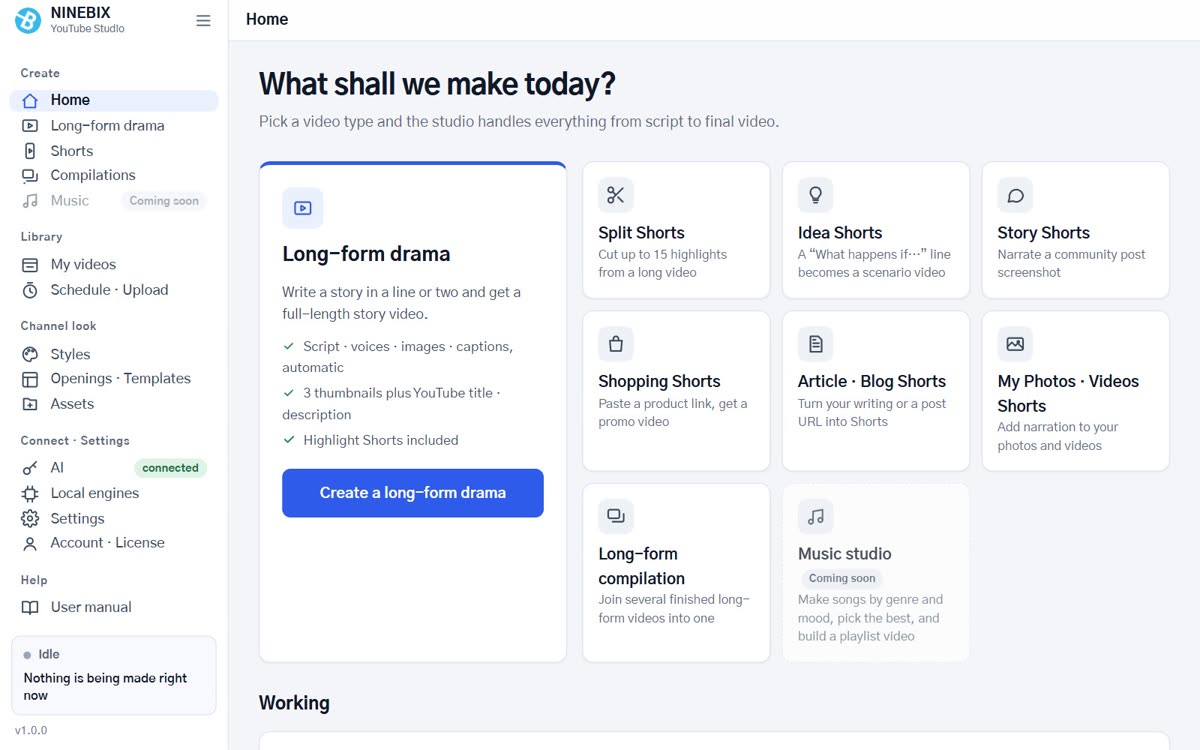
- Long-form audio drama — story → script · voices · scene art · video
- Choice of voice engines · voice library · multilingual (KO·EN·JA·ES)
- Three thumbnails + YouTube upload package (title, description, tags, chapters)
- Opening card · corner loop video · background music & SFX
- Music studio — pick a mood to compose · polish · playlist videos; chosen tracks become long-form and Shorts background music
- Local PC engines — scripts, images and music on your own graphics card, no API key (6GB+ VRAM)
- Scripts and images use an API key (ChatGPT, Gemini, Claude, OpenRouter) or the local PC engines — external AI is billed to your own key account, the local engines have no per-request fee (graphics card required). The default voice engine runs free on your PC.
Make long-form audio dramas, thumbnails and upload packages without signing in. After buying a course, install the course edition from My courses — it installs over the free edition and keeps your videos and settings.
Download free edition (v0.9.0)Which version is for you?
The free edition and the course edition are separate apps — get the one you need.
Free edition
- Long-form audio drama — story → script · voices · scene art · video
- Three thumbnails + YouTube upload package (title, description, tags, chapters)
- Opening card · corner loop video · background music & SFX
- Choice of voice engines · voice library · multilingual (KO·EN·JA·ES)
Course edition
- Everything in the free edition + new features for 1 year from purchase (auto-updates)
- Shorts studio — seven formats (clip split, idea, story, shopping, article, my photos, my script) + template editor
- Living scenes — characters and backgrounds move separately, with per-scene SFX and music
- Music studio — five moods · track design · technical checks · polish (−14 LUFS) · playlist videos; chosen tracks go straight into long-form and Shorts music
- Local PC engines — script (Gemma 4), image (FLUX.2 klein) and music (ACE-Step 1.5) on your own graphics card, no API key (6GB+ VRAM, 4GB for music; 4–5GB model download each)
- Monthly planning · scheduled uploads · library · course videos (My courses)
| Free edition | Course edition | |
|---|---|---|
| Price | Free | US$110 (course included) |
| Sign-in | None | The Google account you bought with · 2 PCs |
| Updates | None (v0.9.0) · install the course edition over it to upgrade | Automatic for 1 year — keep using your last version after that |
| Long-form audio drama | Yes | Yes + living scenes · opening editor · voice speed |
| Shorts | — | 7 formats + template editor · live preview |
| Music studio | — | Compose · polish · playlist videos · long-form & Shorts music |
| Local PC engines | — | Scripts, images and music without an API key (graphics card, 6GB+ VRAM) |
| Course videos | — | In My courses |
How to install
- Run the installer (1–2 minutes; Python, voice models and browser in one go).
- If "Windows protected your PC" appears, click More info → Run anyway.
- In the course edition, sign in with the Google account you bought with.
- In AI connections, paste an API key for scripts and images (ChatGPT, Gemini, Claude or OpenRouter) or install the local PC engines and you are ready — external AI is billed to your own key account, the local engines have no per-request fee (graphics card required).